This tool review is part of our: AI Tools and Resources
Blackbox AI Review (2026): The Ultimate Prototyping Cheat Code for Product Leaders
As a Product Manager, there is nothing more frustrating than having a brilliant Figma mockup ready, only to be told by engineering that UI implementation will take another three sprints. Time-to-market is everything, and traditional bottlenecks between design and development are where great MVPs go to die.
Recently, my team and I integrated Blackbox AI into our product development cycle. Unlike typical autocomplete tools meant solely for backend devs, this AI agent acts as a multi-modal bridge. By allowing us to turn static images and wireframes into live, functional code instantly, it fundamentally changed how fast we validate ideas in the market.
Inside This Review
1. How We Tested
Our test setup
Over a three-week sprint cycle, our product team ran Blackbox AI on real discovery work: converting two Figma flows and one competitor screenshot into working React + Tailwind prototypes, then handing them to engineering for review. We compared turnaround against our usual designer-to-frontend handoff and against GitHub Copilot for the same UI tasks. Screenshots in this review are from our own account.
2. The Product ROI: Pros and Cons
Evaluating an AI tool requires looking at how it affects the bottom line: speed to market and resource allocation.
The Highlights
- The Image to Code AI feature radically shrinks the time between Figma handoff and a working frontend prototype.
- Allows technical Product Managers to generate and test UI elements independently without distracting the core dev team.
- Rapidly replicates competitor features for A/B testing using visual screenshot processing.
The Limitations
- It does not eliminate the need for engineers; complex database architecture still requires human expertise.
- The Free Plan's query limits will quickly bottleneck a fast-moving product team.
- Generated UI code sometimes requires manual CSS tweaking to achieve pixel-perfect alignment.
3. Who Should (and Shouldn't) Adopt It
Not every team structure benefits equally from visual AI agents. Here is where Blackbox AI delivers the most value.
Ideal For:
- Product Managers & Founders: Who need to spin up landing pages, MVPs, and feature prototypes rapidly.
- Frontend Engineering Teams: Looking to eliminate the tedious boilerplate work of translating design files into React or Vue.
- Growth Teams: Running high-velocity A/B tests on UI variations.
Less Useful For:
- Pure Backend DevOps: Teams managing invisible infrastructure and server logic will find fewer use cases for the visual tools.
- Strictly Non-Technical PMs: You still need a fundamental understanding of HTML/React to deploy the code it generates.
4. From Wireframe to MVP: The Image-to-Code Engine
The feature that makes Blackbox AI a mandatory tool for product-led growth is its multi-modal visual processing. Transforming static designs into live code is the ultimate cheat code for product validation.
Bridging Design and Development
Here is how my team utilizes the Image-to-Code intelligence to accelerate our sprints:
- 📸 Competitor Analysis to Code: When testing a new onboarding flow inspired by a competitor, we take a screenshot. The AI generates the structural HTML and Tailwind CSS in seconds, allowing us to tweak and test immediately.
- 🎨 Figma to Live React: The platform seamlessly converts refined Figma wireframes directly into production-ready frontend code, saving our engineers hours of manual styling.
- ✍️ Napkin Sketch Prototypes: In early ideation, a PM can upload a photo of a whiteboard wireframe, and the AI will scaffold a basic functional web layout to share with stakeholders.
Rapid MVP Launches
Bypass the typical frontend bottleneck. Go from a visual concept to a clickable, testable prototype in a fraction of the time.
Technical Validation
PMs can use the Code Chat to query complex backend logic, helping them understand technical constraints without bothering the engineering lead.
Vision Capabilities
Upload UI screenshots or wireframes and watch the AI instantly construct the structural boilerplate code.
5. Our Scorecard
Each criterion is scored on its own; the 4.8 headline is their average. Blackbox AI scores highest exactly where product teams feel pain — turning a visual into working UI — and dips on value once query limits force a paid plan.
6. Blackbox AI vs Copilot (A Product Perspective)
When engineering asks for budget for an AI tool, they usually request GitHub Copilot. While Copilot is excellent for pure developers, Blackbox AI offers broader utility for the entire product squad.
| Product Impact | Blackbox AI | GitHub Copilot | ChatGPT (Pro) |
|---|---|---|---|
| Core Strength | Visual-to-Code & Frontend Velocity | Predictive inline typing for devs | General ideation & text generation |
| Time-to-Market | Massively reduces UI implementation time | Speeds up backend logic coding | Helps outline architecture |
| Cross-Functional Use | Excellent for PMs, Designers, & Front-End | Strictly an engineering tool | Useful for marketing and strategy |
| The PM Verdict | The best tool for rapid visual prototyping | Necessary for your backend devs | A daily conceptual assistant |
The Reality Check: If your goal is to help your engineering team build scalable backend databases slightly faster, buy them Copilot. If your goal is to shrink the time it takes to get a user interface from a designer's brain onto a user's screen, Blackbox AI is unmatched.
7. Team Integrations and Pricing Breakdown
For a tool to be adopted by a product team, it must integrate seamlessly. Blackbox AI offers flexible access points across your stack.
- VS Code Extension: Plugs right into your developer's IDE for seamless workflow integration.
- Chrome Extension: Crucial for Product Managers capturing screenshots from the web to convert into prototype code.
- GitHub Integration: Allows teams to query repository structures and understand pull requests faster.
Scaling with Blackbox AI
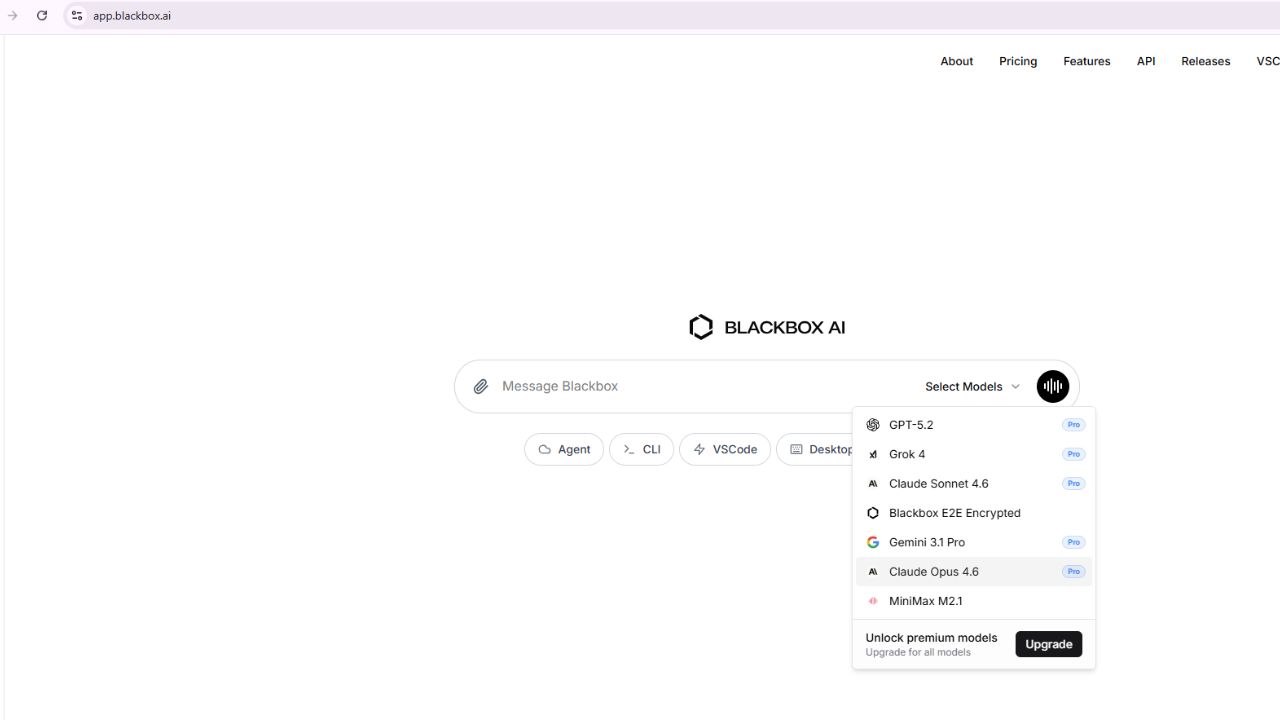
Blackbox operates on a freemium model. The Free Plan is perfect for a Product Manager wanting to test the visual capabilities on a few wireframes. However, once your engineering team adopts it for daily UI generation, the query limits will become restrictive. Budgeting for the Pro Plan is highly recommended to unlock priority GPU processing and keep product momentum high.
A Note on Product Quality
AI accelerates the *building* phase, but it does not replace QA. Ensure your engineering team still conducts rigorous peer reviews on all AI-generated UI to guarantee accessibility, responsiveness, and security.
8. Top Alternatives to Blackbox AI
If Blackbox AI isn't the right fit, these are the tools we'd put on your shortlist for the same design-to-code job.
GitHub Copilot
Pick it when the priority is backend velocity for your engineers, not visual prototyping.
Read our review →v0 by Vercel
Strong when you want prompt-to-UI generation tightly coupled to a React/Next deploy path.
Read our review →Cursor
Best for teams that want an AI-native IDE for full-codebase edits, not just UI scaffolding.
Read our review →Frequently Asked Questions (FAQs)
Q: How does Blackbox AI help Product Managers specifically?
A: It drastically reduces time-to-market. PMs can use the Image-to-Code feature to turn wireframes or competitor screenshots into functional UI code without waiting weeks for frontend engineering resources to become available.
Q: Can it convert Figma designs directly to React?
A: Yes, Blackbox AI excels at taking static Figma mockups and translating them into production-ready frontend code like React and Tailwind CSS.
Q: Does this replace my engineering team?
A: No. Blackbox AI accelerates UI development and prototyping, but you still need skilled engineers to manage backend databases, API security, and complex business logic.
🔗 Official Reference Links
Stop Waiting Sprints for UI Prototypes
Blackbox AI's visual-to-code capabilities bridge the gap between your product vision and a live MVP. Give your team the ultimate prototyping advantage.
Start Prototyping For Free Today